Mostly Linux & Python syntax notes and hyperlinks.

Wednesday, January 22, 2025

Windows Batch Script - parse out Drive and top-level directories

Given 

echo %CD%

   result:   E:\abcd\efg\hijk\lmno

To pull out "E:\abcd\efg" from this path and set it to a variable named TRUNK:

for /f "tokens=1,2,3 delims=\" %%G in ("%CD%") do set TRUNK=%%G\%%H\%%I

echo %TRUNK%

   result:    E:\abcd\efg

Note the need to restore the backslashes that were pulled out as token delimiters.

If you prefer to convert the path to use forward slashes while you're at it:

for /f "tokens=1,2,3 delims=\" %%G in ("%CD%") do set TRUNK=%%G/%%H/%%I

echo %TRUNK%

   result:   E:/abcd/efg 


Wednesday, September 25, 2024

Windows Batch Script Time Stamp - beware the morning space

I had been creating a time stamp just to give my output unique file names so as not to overwrite previous test output.

I'd been doing this:

REM TT= time tag for this run
set T=%time%
set TT=%T:~0,2%%T:~3,2%%T:~6,2%

It works fine after 10 am:

C:\Users\mharrison>set TT=%T:~0,2%%T:~3,2%%T:~6,2%
C:\Users\mharrison>echo %TT%
100359
C:\Users\mharrison>echo filename%TT%
filename100359

I've been using this time stamp method for weeks, but apparently never before 10 am. It broke my code this morning. Before 10am, the plain old time inserts a space:

C:\Users\mharrison>echo %time%
 9:56:08.38

So when I try to append it to make a unique file name, I insert a space in the file name, which confuses the code:

C:\Users\mharrison>set TT=%T:~0,2%%T:~3,2%%T:~6,2%
C:\Users\mharrison>echo %TT%
 95740
C:\Users\mharrison>echo filename%TT%
filename 95740

So I changed the method to only use the 2nd digit of the hour:

REM TT= time tag for this run
set T=%time%
set TT=%T:~1,1%%T:~3,2%%T:~6,2%


Testing in the Command Prompt window after 10am: 
C:\Users\mharrison>set T=%time%
C:\Users\mharrison>echo %T%
10:11:54.96 
C:\Users\mharrison>set TT=%T:~1,1%%T:~3,2%%T:~6,2%%T:~1,1%%T:~3,2%%T:~6,2%
C:\Users\mharrison>echo %TT%
0115401154
C:\Users\mharrison>echo filename%TT%
filename0115401154 


Wednesday, July 26, 2023

Xms size must be multiple of 1024

 from java (oracle.com) and java (oracle.com):

-Xmssize

Sets the minimum and the initial size (in bytes) of the heap. This value must be a multiple of 1024 and greater than 1 MB. Append the letter k or K to indicate kilobytes, m or M to indicate megabytes, g or G to indicate gigabytes.

The following examples show how to set the size of allocated memory to 6 MB using various units:

-Xms6291456
-Xms6144k
-Xms6m

Also for 

Friday, April 28, 2023

Compressed Windows C-drive and LTS Ubuntu

I compressed my PC's Windows 10 C drive after spending a very long time trying to figure out how to get it out of the "red". Unfortunately, the next time I started up LTS Ubuntu, it complained about the virtual disk being compressed and would not start up.

I followed other web advice to look under C:\users\[me]\AppData\Local\Packages

There I found something named CanonicalGroupLimited.Ubuntu20.04onWindows_79rblahblah ..

After I decompressed that package LTS Ubuntu worked again.

Wednesday, March 22, 2023

python len() for record offsets

 From a colleague:

In case you ever have to do an f.seek():

When calculating record offsets, python only does a consistent and correct len() value if your file is opened in binary.


Friday, March 3, 2023

Performance illusion from using repetitive test data

We often copy a few fake records to create a large input file with which to test how the code handles it.

It's a useful test; but don't use it to gauge performance. 

Data from repeated records can be cached and reused. If your production data will vary, then it won't get the same use out of caching. Caching could even hurt performance.

Wednesday, July 8, 2020

Windows batch script - decimal points and comma separators

Adding a decimal place to express ms as seconds:


C] echo %ms:~0,-2%.%ms:~-2,2%
123.45

C] echo %m2:~0,-2%.%m2:~-2,2%
12.34

C] set m1=123

C] echo %m1:~0,-2%.%m1:~-2,2%
1.23

C] set m0=23

C] echo %m0:~0,-2%.%m0:~-2,2%
.23

C] set m=2

C] echo %m:~0,-2%.%m:~-2,2%
.2

C] set m=02

C] echo %m:~0,-2%.%m:~-2,2%
.02

To insert commas, not so simple:

C]  set m=123456789

C]  echo %m%
123456789

C] echo %m:~-3,3%
789

C] echo %m:~-6,3%,%m:~-3,3%
456,789

C]  echo %m:~-9,3%,%m:~-6,3%,%m:~-3,3%
123,456,789

C]  echo %m:~-12,3%,%m:~-9,3%,%m:~-6,3%,%m:~-3,3%
123,123,456,789


More complex solutions at https://stackoverflow.com/questions/28700043/thousands-separator-of-an-integer-value


C]  echo %m%
123456789

C]  if %m% GTR 99999999 (set c=%m:~-9,3%,%m:~-6,3%,%m:~-3,3%)C]  echo %c%
123,456,789

C]  set n=12345

C]  if %n%  GTR 99999999 (set c=%n:~-9,3%,%n:~-6,3%,%n:~-3,3%) else ( if %n% GTR 9999 (set c=%n:~-6,3%,%n:~-3,3%) )

C]  echo %c%
123,345       WRONG!!

Wednesday, March 18, 2020

Using RegExp in Notepad++ to convert all RollingFileAppender to DailyRollingFileAppender in a log4j.properties file

1) Change RollingFileAppender to DailyRollingFileAppender

Search for

log4j.RollingFileAppender

Replace with

log4j.DailyRollingFileAppender


2) To comment out the MaxFileSize line:

Search for

log4j\.appender\.[a-zA-Z]+\.MaxFileSize

Replace with

#$&

This works because $& matches the entire expression matched.
(Commenting out instead of deleting in case you want to go back to Rolling.)

3) To comment out the MaxBackupIndex line:

Search for

log4j\.appender\.[a-zA-Z]+\.MaxBackupIndex

Replace with

#$&


4) To insert the DatePattern='.'yyyy-MM-dd line just before existing log4j.appender.SOMETHING.layout= line:

Search for

(log4j\.appender\.[a-zA-Z]+\.)layout=

Replace with

${1}DatePattern='.'yyyy-MM-dd\n$&

This works because:
The parentheses marking from "log4j" to just before "layout" marks out the part returned by ${1}
Then the "\n" adds a newline
Then the $& restores the beginning of the layout= line.


-->

Tuesday, October 15, 2019

TrackMyUniverse


I’ve lately been looking at GitHub and listening to python podcasts trying to think of a python project to do. I remembered a Prolog project I wrote for a class I was taking at Harvard Extension back in the ‘80s. Prolog has a built-in inference engine, so I wrote a story chronology tool. E.g. if event A happens before event C and B before A then B was before C.

For decades, now, I’ve been writing bits of stories that all take place in the same space fantasy universe.
I have boxes and Google docs folders full of drafts.
There are some sort of finished parts: A few TV mini-series scripts, a full-length screenplay, a novella, and a novel that once could be read as finished until, under the influence of its 3rd or 4th writing group, I tore it apart and never pieced it back together again.

Whenever I return to writing about my universe I need to find the correct draft and update there.

Sometimes, I’d like to be able to open my computer and just start typing.

Maybe I could write a python tool for this.
It could use a noSQL database- since it would be literally collections of documents.
One point of access would be a character list.
Another would be places: each event or story fragment occurs at a particular place.
Events are characterized by characters and places.
Places and characters have event histories.
Characters are connected by family relationships from which obvious chronologies can be inferred. No significant time travel, so events when parents are young can be inferred to occur before events when their children are adults, etc.
Characters are also connected by time spent together- in the same place or in the same spaceship.

I’d also like to tie in version control for saving multitudinous versions of paragraphs, chapters, scenes, lines of dialogue, whatever.

Eventually, one could walk into this universe and look around.

Friday, August 9, 2019

Windows - using %CD% for current directory and levels

For windows scripting, you can access levels above %CD%. Just remember to use backslash, not forward slash:

C:\Users\mharrison>echo %CD%
C:\Users\mharrison
C:\Users\mharrison>dir %CD%\..\..
 Volume in drive C is Windows
 Volume Serial Number is E431-FA9F
 Directory of C:\
03/03/2017  11:02 AM    <DIR>          DRIVERS
04/11/2018  07:38 PM    <DIR>          PerfLogs
05/31/2019  02:25 PM    <DIR>          Program Files
05/15/2019  09:04 AM    <DIR>          Program Files (x86)
03/25/2019  05:33 PM    <DIR>          test
05/13/2019  10:56 AM    <DIR>          Tools
04/09/2019  09:21 AM    <DIR>          Users
08/08/2019  06:02 PM    <DIR>          Windows
               0 File(s)              0 bytes
               8 Dir(s)  61,991,501,824 bytes free

C:\Users\mharrison>dir %CD%/..
Invalid switch - "..".

Also, check out this great tool for formatting code for blogging on blogger:
http://formatmysourcecode.blogspot.com/

Thursday, April 12, 2018

Centos Firstboot - No Way Out

So I continued following the advice in CentOS 6 Linux Server Cookbook.
I installed firstboot.
    yum -y install firstboot
    chkconfig firstboot on
One is supposed to be able to navigate using arrow keys.
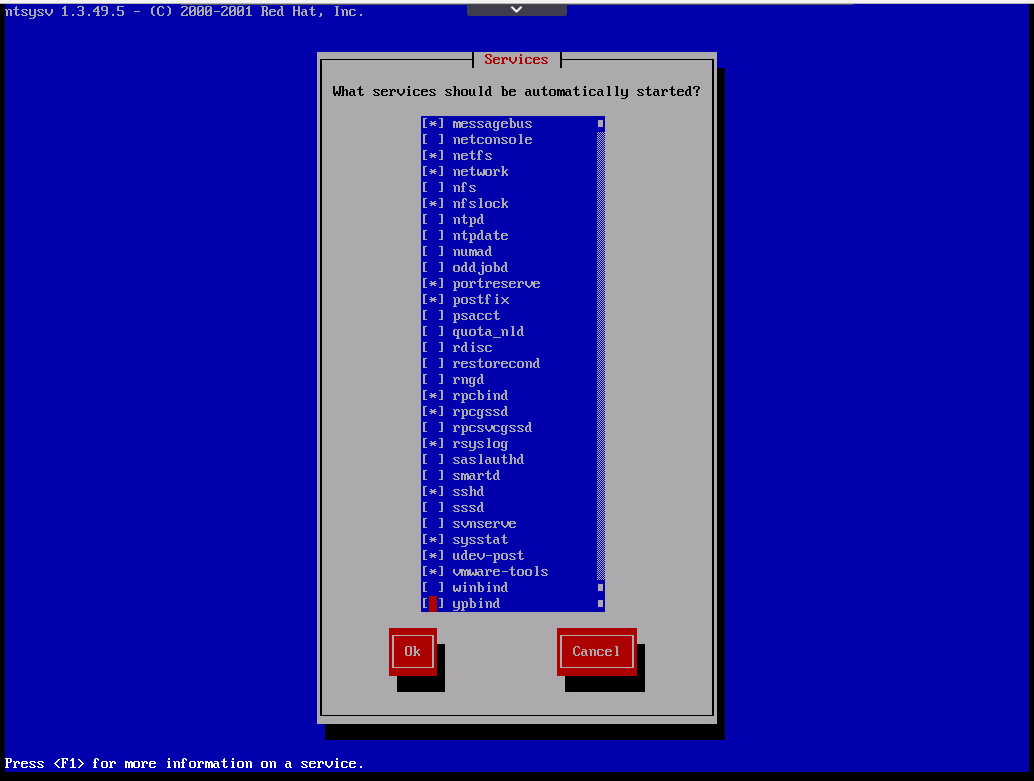
That worked until this screen:
But suddenly, the tab keys worked! Now I can leave.
Never mind.

Trying to set up new CentOS 6.5 from Skytap Template

OK, figured how to log in from Settings / Credentials - Default password comes with the template.
Using CentOS 6 Linux Server Cookbook from www.safaribooksonline.com.

1st I used the directions from https://help.skytap.com/vmware-tools-linux.html to install VMWare tools.
I had to do a "mkdir /media/cdrom" since /media was there, but not /media/cdrom.
After that, the mount command and the rest of the instructions worked.

Then, following the Cookbook, I did

yum -y update

This took a while. It looked like a lot of packages were updating.

Then I got the error message:

kernel panic not able to mount root fs on unknown block(0,0)

I tried rebooting and got a message about operation failed because VMWare Tools are still loading:
There are other options:

I don't have much to lose, so I try Reset. But I get the same message about VMWare Tools still loading. So I click the Power off button...
It is now Powered Off.
I click the Run button... 
I open the VM:

Hmm.
Well, I can delete the VM and start again.
Or give up on creating my own, and just copy a more set-up VM from a co-worker.

Oh well.

5 minutes later:  OK, but, WhatifItry:
1) Create a new VM from Template
2) Don't add CPU, disk space, memory, like I did before
3) Do the yum -y update BEFORE trying to install the VMWare tools.

---

Here we go again:


...

It rebooted, and let me log in.
Should I install VMWare tools now?


Monday, May 15, 2017

python: Read in generic lookup table from tab-separated text file with field-names on top line

not beautiful yet, but here's a start:

lookup={}
fd=open("tab_separated_fields.txt", 'r')
try:
    headers=fd.readline()
    names=headers.split()
    num_fields=len(names)
    print "%d fields in %s" % (num_fields,names)

    for row, line in enumerate(fd,1) :
        print "row %d: line=%s" % (row,line)
        if len(line) > 10:
            values=line.split('\t')
            if len(values) == num_fields:
                lookup[str(row)] = {names[i]:(values[i]).strip() for i in range(num_fields)}
            else:
                print "row %d doesn't have %d values" % (row,num_fields)
finally:
    fd.close()
print lookup

Next, see if csv reader makes it better.
Actually, csv.DictReader.
e.g https://github.com/pargery/csv_utils2/blob/master/SimpleCSVReporter.py

Friday, April 21, 2017

Mediocre Windows Batch Script to Measure Time

Well, it uses clock time, and would be more useful as a called subroutine, but this is what I've got so far:

rem Test Timing

rem You might need to set this in later versions and also use !time 

setlocal enabledelayedexpansion

set start_time=%time%
echo start_time is %start_time%

pause
rem Replace above 'pause' with activity to be timed (approx).

set end_time=%time%

rem Now calculate time difference


echo started %start_time%
echo ended %end_time%


rem To get a substring, do this:
rem    %variable:~num_chars_to_skip,num_chars_to_keep%

rem Here we also prepend "1" to 2-digits and then subtract 100 
rem   to avoid numbers like "02"
rem   which can cause errors in the windows batch interpreter.

set sh=1%start_time:~0,2%
set eh=1%end_time:~0,2%
set sm=1%start_time:~3,2%
set em=1%end_time:~3,2%
set ss=1%start_time:~6,2%
set es=1%end_time:~6,2%
set sms=1%start_time:~9,2%
set ems=1%end_time:~9,2%

echo sh %sh%, eh %eh%, sm %sm%, em %em% and sms %sms%, ems %ems%
pause

set /A start_secs=(%sh%-100)*3600 + (%sm%-100)*60 + (%ss%-100)
set /A end_secs=(%eh%-100)*3600 + (%em%-100)*60 + (%es% - 100)

set /A start_ms=(%start_secs%)*100 + (%sms% - 100)
set /A end_ms=(%end_secs%)*100 + (%ems% - 100)

set /A diff=%end_ms% - %start_ms%

echo %start_ms% to %end_ms% is %diff% milliseconds 

pause

Lots of "pause"s to check how it's going.
You can take them out.
Better versions welcome, too.

Tuesday, March 29, 2016

Pseudocode for Vintage Shell Crochet Hat

Link to original pattern: http://crochet.about.com/library/blshellhat1.htm

This pattern begins with a repeating sub-pattern that takes up 4 stitches of the previous row.
Hence, you need to start with a row of 4*M stitches
In the original pattern, M=6, so you start with 24 base stitches.

U.S. Terms for crochet stitches
dc = double crochet (UK tc)
sc = single crochet   (UK dc)

# if no input number, assume i=1
# general method
def stitch(stitch_name,int i=1):
    crochet i stitch_name stitches

def chain(int i=1):
    stitch(chain,i)

def dc(int i=1):
    stitch(double-crochet, i)

def sc(int i=1):
    stitch(single-crochet, i)

def skip(i):
    skip i stitches from previous row before the next stitch in this row

  
#The definition of "shell" varies with pattern. In this pattern:
def shell(int i, stitch previous_row_stitch):
    dc(i) into the same previous_row_stitch

def flip_work():
    #Rows are worked away from the direction of the dominant hand,
    #If you're right-handed, this means: from right to left


#Turning chains are chains made at the end of the row.
def dc_turning_chain(int i=3):
    chain(i)
    flip_work()

    
#initial loop
def initial_loop(int M):
    chain(M-1)
    join the loop together

# single crochet into all the stitches of the previous row
def end_hat(int i)
    sc(i)

# Pattern = loop of 5 chain-stitches
#           1 row  of dc(24)        =       24 stitches
#           1 row  of sc + shell(3) = 4*6 = 24 stitches
#           2 rows of sc + shell(5) = 6*6 = 36 stitches
#           3 rows of sc + shell(7) = 8*7 = 56 stitches
# dc_turning_chain(3) between each row
# end with single-crochets

# M=6, N=3
def vintage_hat(int M, int N):
    
    initial_loop(M)     # chain 5 & join
    dc_turning_chain()  # chain 3 & turn work

    # 24 double-crochets into the loop
    dc(M*4) into the loop, ignoring the chain stitches themselves

    # now you have M*4 stitches to start the pattern

    # The repeating pattern is as follows:
    # skip 1, sc, skip 1, shell

    # First row:
    for R = 1 to M: #repeat until end of row
        skip(1)
        sc()
        skip(1)
        shell(3) # = 2*1+1 = 3 dc into stitch below

    # Now you should still have 24 stitches in the circle
    #
    for S = 2 to N:
        for row=1 to S:
            repeat until end of row:
                skip(1)
                sc()   into center of previous shell
                shell(2*S+1) into previous row's sc  
            end of row: dc_turning_chain(3)
   shell_size=2*N+1  #=2*3+1=7
   pattern_size=shell_size+1 #=8
   number_of_stitches=pattern_size * M  #=8*6
   end_hat()

Thursday, March 24, 2016

python: a little bit about dunder functions

What I learned from looking at Fluent Python yesterday:
  • Functions defined with surrounding double-underlines (“dunder”) are called differently
    •  e.g. len(my_object) instead of my_object.len()
  • In general, we shouldn’t create new dunder  functions
    • One reason is that newer versions of Python might use the same name
  • __repre__ is called by __str__ if no __str__ defined, so it’s more important to define __repre__()  
  • If no __bool__ defined, then python uses __len__() and returns False if 0, True otherwise

Friday, March 4, 2016

Advice on Managing SW Enhancement Requests - Links

From https://www.novell.com/communities/coolsolutions/what-happens-enhancement-requests/:
Once I have seen the request I generally do one of 4 things with it almost immediately.
1. If I know that this is a duplicate of another request I close the new one and mark it as a duplicate of the original.
2. If I see no value to the request, or I see value but the opportunity cost is too high, then I will just close it.
3. If I see value to the request, and it fits in with much of the feedback received on all of the other channels then I will assign it to be considered for a release
4. Finally I can choose to do nothing with it right now. This final one allows me to bear it in mind and use it for consideration on future requests.

From http://support.aha.io/hc/en-us/articles/202000757-Best-practices-to-managing-and-prioritizing-features:
  1. You need to know what the goals or key business drivers are for your product so you can create a scorecard that includes these key metrics.;
  2. If it is not clear who owns prioritization, your scoring will not be trusted. It's essential to know who is in charge;
  3. If there is not enough detail per feature, then the functionality of each feature will be unclear.
From http://johnpeltier.com/blog/2013/12/12/feature-requests/:
  1.  Ideas that don’t fit with the long term vision for the product at all.  These receive a polite rejection.
  2. Many, many good ideas that you might do someday.  These are usually acknowledged but sit in the “someday” bucket.
  3. A few ideas which map to the area of the product that needs work next, or the next most important problem to solve.
Once prioritized, you’ll want to communicate your plans in a roadmap that doesn’t tie you to specific dates.
From https://www.quora.com/How-should-a-product-manager-handle-communication-to-internal-people-who-make-feature-requests-when-the-volume-of-requests-far-exceeds-engineering-capacity:
The backlog should not be a dumping ground for all ideas that may get worked on eventually, or may not. It will become impossible to manage and just gives the requestor a false sense of security by having it added. If you don't see yourself working on a backlog item in the next ~4 months, I recommend just telling the person no, point blank, or maintaining a separate list or roadmap outside of the backlog for these items.

Tuesday, February 2, 2016

python: initialize a dictionary with input arguments key value key value etc


If you invoke scriptname with list of key names followed by their values.
e.g.
         python scriptname.py A 1 C 3 B 2

Then you could parse it like this:

dd={}

for i in range(1,len(argv),2):
    dd[sys.argv[i]]=sys.argv[i+1]

Toy code to test:

>>> params=['scriptname','A',1,'C',3,'B',2]
>>> dd={}
>>> for i in range(1,len(params),2):
...     dd[params[i]]=params[i+1]
...   
>>> dd
{'A': 1, 'C': 3, 'B': 2}

python: supply default values for incomplete dictionary


>>> default_dd={'A':1,'B':2,'C':3,'D':4,'E':5}
>>> dd={'B':2000,'D':4000}
>>> for key in default_dd.keys():
...     if not key in dd.keys():
...         dd[key]=default_dd[key]
...       
>>> dd
{'A': 1, 'C': 3, 'B': 2000, 'E': 5, 'D': 4000}


python: initialize a dictionary with uncertain number of input values

If you know the order of the expected input parameters, but you don't know how many will be supplied:


if __name__ == "__main__":
    #initialize list of expected parameters, in order
    dd_parameters=['scriptname','A','B','C','D','E']
    dd={} 
    if len(sys.argv) > 1: 
        #loop through the actual input parameters
        for i in range(1, len(sys.argv)):
            dd[dd_parameters[i]]=sys.argv[i]

See, you automatically stop at the end of the number of input parameters.
Here's some toy code to test the logic:

 >>> std_parms=['scriptname','A','B','C','D']
 >>> input_parms=['scriptname','A_Value','B_Value']
 >>> dd={}
 >>> for i in range(1,len(input_parms)):
 ...     dd[std_parms[i]]=input_parms[i]
 ...
 >>> dd
 {'A': 'A_Value', 'B': 'B_Value'} 

After that, you may want to fill in the default values for the parameters not supplied.